 1200
627
1200
627
Printing Your Own Plant Labels: A Guide for Garden Centres and Nurseries
Written by
Matt Lawson
OKI shop, The OKI Pro Series printer experts 310
310
310
310
Read it in 7 minutes
Most garden centres and nurseries arrive at the same question from the same direction. A bench of perennials needs labelling this week, not next month. A price changes, a promotion starts, or a batch arrives with nothing on it at all — and the trade printer needs a minimum order and a lead time that suit neither the quantity you actually want nor the day you want it.
Printing your own plant labels is usually a fix for the timing problem before it is a fix for the price problem, and that distinction is worth holding on to when you weigh it up. This guide covers how in-house horticultural labelling works end to end — design, media, print and apply — and what to look for in a machine.
What is in-house plant label printing?
In-house plant label printing means producing your own plant labels, self-ties, pot pointers and bed cards on a printer at your own site, instead of ordering pre-printed labels from a trade printer.
You print full colour onto blank horticultural media, in whatever quantity you need, on the day you need it. There are no plates to make and no minimum order.
What can you print on one machine?
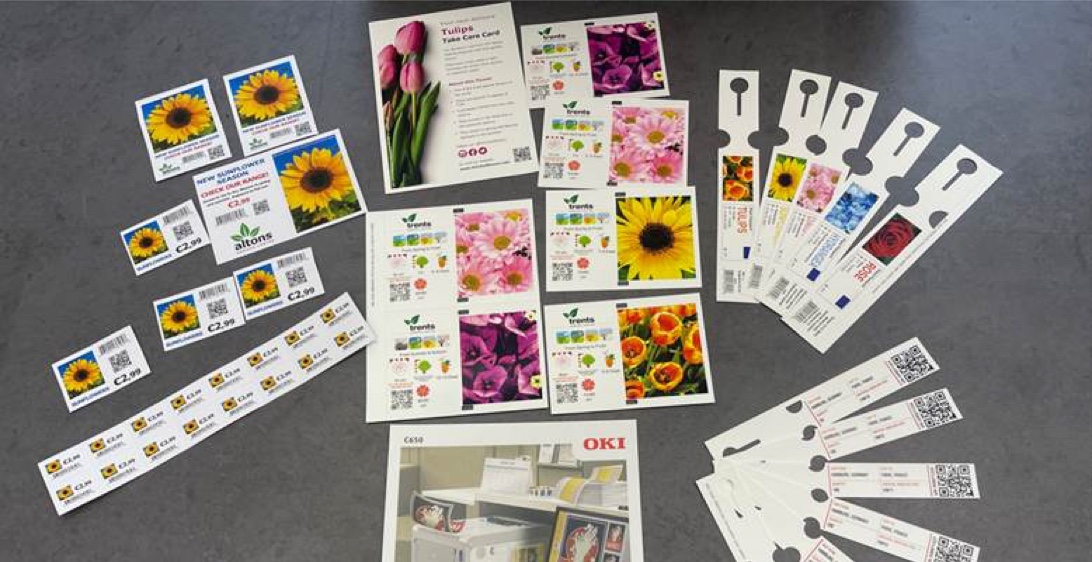
Considerably more than labels. One A3 colour printer will produce self-ties, pot pointers and bed cards, along with most of the printed material a garden centre currently buys in:
- Self-tie labels: loop locks and tie wraps for shrubs, trees and climbers
- Stick-in labels: pot pointers and push-in labels
- Self-adhesive labels for pots and trays
- Weatherproof plant pot labels on synthetic media
- Swing tags and bed cards
- Shelf edge cards and point-of-sale notices
- Banners and seasonal display material
- Christmas tree labels
- Promotional flyers, business stationery and business cards
That last group is the one most people leave out of the calculation. The same machine that labels the plants also prints the promotion above them, the bed card in front of them and the flyer at the till.
If you count only labels when you work out whether a printer pays for itself, you are counting about half of what it does.
How does in-house label printing work?
There are four stages: design, media, print and finish.
- Design the label. Labels are designed on a PC in label software, then saved as a template you reuse. A nursery typically needs one template per label type: a self-tie, a pot pointer, a bed card.
Plant name, care information, barcode and price are pulled into the template and changed per run. Template packs built specifically for horticulture are available for the common label design packages, so you are not starting from a blank page.
If you already hold plant data in a spreadsheet or stock system, that data can usually feed the labels directly rather than being retyped. - Choose the media. This decision affects the finished result more than any other. Horticultural media comes blank and pre-die-cut into the shapes you need, including loop locks, stick-ins and swing tags.
Materials run from coated card up to fully synthetic stock. Indoor point-of-sale can sit on card. Anything going outdoors, into a pot, through watering and a winter needs weatherproof media. - Print. Load the media, select the template, print. There are no plates and no set-up charge, so printing ten labels costs the same per label as printing a thousand. That is the whole point.
You can also change design between runs without changing the media, so a single tray of stock covers a morning’s worth of different plants.
OKI Pro Series machines are LED printers, so the toner is fused dry as the label leaves the machine. Labels can be cut, tied and put out on the bench straight away. - Cut, tie or apply. Pre-die-cut media separates by hand. Loop locks thread around the stem and lock into themselves, stick-ins push into the compost, and self-adhesive labels peel and apply.
For uncut sheet stock you will want a guillotine or a small finishing unit alongside the printer.
What kind of printer do you need for plant labels?
One built for media rather than for paper. A standard office colour printer will not do this work for long. Synthetic media, card stock and banner lengths sit outside what most office machines are built to handle, and label runs wear them out quickly.
Four things matter when you choose:
- Media handling. Check the weight and thickness range the printer accepts, and whether it has a straight-through paper path. Synthetic and heavy card need a route through the machine that does not bend them around tight rollers.
- Colour quality. Plant labels are sales tools as much as identification. Graphic-arts class colour separates a label that looks printed in-house from one that does not.
- Size and length. A3 as a minimum, plus banner lengths if you want bed cards and display material from the same machine.
- White toner. A fifth station carrying white lets you print onto kraft, coloured and clear media. Four-colour machines cannot do this, because white is the absence of toner on a standard printer.
In the OKI Pro Series, the Pro9431dn is the four-colour A3 machine for full-colour label and point-of-sale work.
The Pro9541dn adds a fifth station for spot white or clear gloss. That is the one to look at if coloured or kraft stock is part of the plan.
Will the labels survive outside?
On the right media, yes. Toner is fused to the surface rather than absorbed into it, and on synthetic weatherproof stock the result stands up to watering, handling and a British winter outdoors.
On plain uncoated card it will not, however good the printer. Durability is a media decision first and a printer decision second, so specify the stock before you specify anything else.
When does printing in-house make sense?
When you print many different designs in small quantities, when what you print changes often, when you need labels the same day, or when your range turns over seasonally.
Those are the conditions a trade printer is structurally poor at serving, and they describe most garden centres and retail nurseries.
When is a trade printer still the better choice?
When you print one or two designs in very large volumes and nothing changes. Long, static runs of a single design are exactly what a trade printer is efficient at.
It is also the better choice if nobody on site will take ownership of running the machine. A printer nobody is responsible for is a printer that sits idle.
For most nurseries the answer is not one or the other. Long runs of core lines stay outsourced, and everything short, seasonal, changeable or urgent comes in-house. It is worth taking the time to work out the cost per label both ways before you decide.
How do you get started?
Start with what you would actually print in a typical month: label types, rough quantities, how often designs change, and what point-of-sale you currently buy in or go without.
That list tells you which machine and which media you need. It is also the list that tells you whether the numbers work.
We supply OKI Pro Series printers to garden centres and retail nurseries across the UK, and we are happy to talk through the specification before you commit to anything. Call us on 01903 692222, or send us the details of what you print and we will come back with a recommendation.